
Create a Professional Book Cover in Photoshop —Even If You’re a Beginner
Master the essentials of book cover design in just 1 hour, and start making covers that sell.
Minimal experience needed • Learn at your own pace • Lifetime access

The cover we design together in the beginner course
Have you always wanted to learn how to design for book covers?
You're in the right spot.
Inside this beginner-friendly course, you’ll learn exactly how to go from confused and frustrated… to confident and capable. I show you step-by-step how to transform 3 basic stock images into a stunning cover design.
No fluff. No complicated jargon.
Just clear, step-by-step guidance that actually makes sense.
By the End of This Course, You'll Know How To:
Set up a professional book cover document
Scale and crop images properly
Use color techniques with Camera Raw
Create depth using blur and shading
Place Typography so that it looks professional
Export and prepare your final cover
In just one hour you'll have created your first professional book cover design.
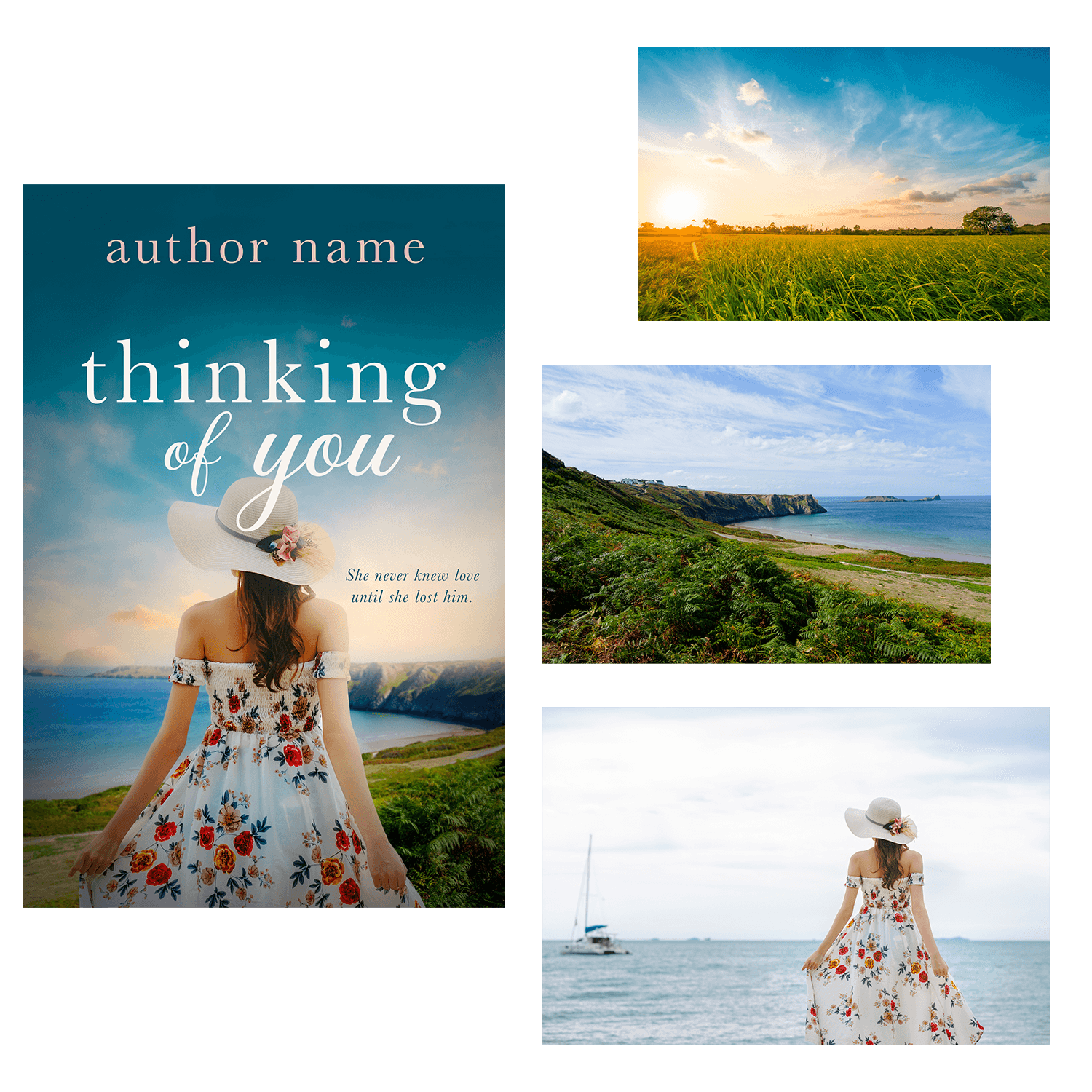
Example cover showing the three images we use in the course to create a beautiful design together
Why This Mini Course
Step-by-step lessons that are easy to follow
Perfect for writers, self-publishers, and aspiring designers
Affordable at just $27 — learn fast, create immediately
Lesson Breakdown
Lesson 1
Setting up the document
Importing images
Scaling images
Cropping / removing backgrounds around a character
Lesson 2
Adjusting the coloring of the image
Creating depth using the blur tool
Using Camera Raw to enhance the design
Adding dynamic shading to create mood
Lesson 3
Adding typography to the design
Typography placement and coloring
Saving and exporting the final cover
This Is Perfect For You If:
beginner Photoshop users
authors designing their own covers
aspiring book cover designers
anyone interested in cover design
This Is NOT For You If: 🚫
You're an advanced Photoshop user
You want shortcuts without learning fundamentals
You don't want to practice

Meet Your Instructor
Hi, I’m Deborah.
I’ve spent over 15 years designing professional book covers and graphics using Photoshop. I have worked, and still work, with publishers and bestselling authors.
I created this course to guide you through the book cover design process. Within 1 hour you will design your very own cover. From there you can take what you've learned to design your next cover. I look forward to joining you on your journey!
What You Can Create With These Skills






All designs have been created by course creator Deborah Bradseth-a seasoned designer with over 20 years experience.
Setting up your Photoshop document correctly
Cropping, scaling, and adjusting images for impact
Color correction, blur effects, and dynamic shading
Typography tips that make your title pop
Exporting your final cover professionally
1 Hour of Expert Instruction: $47
Practice files: $27
Total value: $74
Your Price Today: $27
Try it RISK FREE! 30-Day Money Back Guarantee!
Your Questions, Answered
Do I need Photoshop experience? → Nope! This course is designed for beginners.
What version of Photoshop do I need? → Any recent version of Photoshop works.
How long do I have access? → You will have lifetime access! Go at your own pace and revisit lessons anytime. And access to any and all updates that happen along the way!
Is this course for just authors? → Not at all. Anyone who is interested in book cover design will find great value in this course.
What if this course doesn't work for me? → If, within 30 days of purchasing my course you do not feel you have learned anything new and helpful in your creative journey, contact me for a full refund.
Try it RISK FREE! 30-Day Money Back Guarantee!
Copyright 2025-2026 DB Cover Design, LLC